
·



How to Use ChatGPT Effectively: Build a Repeatable Workflow From Your First Prompt to a Verified Final Result
Here's the short version. Tell ChatGPT what you want, and be clear about it. Hand over the background it can't guess, such as who the answer is for and what limits apply. Choose the format you'd like back. Then read the result like an editor, not a fan. Ask follow-up questions until the draft works, and check any fact that matters before you lean on it. Remember that the first answer is just a draft. A beginner can see better results in a few minutes with one simple prompt formula. People who use it daily go further: they keep the prompts that worked and reuse them as workflows.
Key Takeaways
● Say exactly what you want.
● Give context, since ChatGPT can't see your situation.
● Use the formula: Goal, Context, Task, Constraints, Examples, Format.
● Follow up in small steps rather than writing one giant prompt.
● Verify facts, numbers, and sources.
● Protect private data.
● Save the prompts that work, then reuse them.
What Does Using ChatGPT Effectively Mean?
It means getting a useful, accurate result for a real task, and not losing an hour to rework.
Simple explanation: ChatGPT isn't a search box. Search gives you a pile of links and leaves the sorting to you. ChatGPT takes your instructions and acts on them. Give it fuzzy ones and you get a fuzzy answer. Give it sharp ones and the answer sharpens too.
Technical explanation: ChatGPT is an AI chatbot made by OpenAI and built on a large language model (LLM). It predicts helpful text using your prompt and everything said earlier in the chat. It doesn't "know" facts the way a person does. So yes, it can sound completely sure of itself and still be wrong.
Entity map: ChatGPT → is an → AI assistant → uses → large language model → responds to → prompts → improved by → context and follow-ups → made reliable by → human verification.
How Does ChatGPT Work in Practice?
It reads your prompt and the conversation so far, then writes a reply to match. Follow-ups are how you steer it.
Part | Meaning |
Prompt | Your instruction |
Context | Background, files, examples, tone |
Response | ChatGPT's draft |
Follow-up | Your correction or request |
Weak answer? Look at your instructions first. Nine times out of ten that's where the fix is, and a different tool won't change much.
How to Use ChatGPT Effectively: The 8-Part Formula
The order is Goal → Context → Task → Constraints → Examples → Format → Review → Refine.
● Goal: "I need to prepare for a job interview on Friday."
● Context: "I'm applying for a junior data analyst role. I know basic Excel."
● Task: "Create 10 likely interview questions."
● Constraints: "Beginner level. Plain English."
● Examples: "Like: Tell me about a time you found an error in data."
● Format: "Use a table with question and answer outline."
● Review: Check the accuracy, and check that it fits what you need.
● Refine: "Make answers shorter. Add one SQL question."
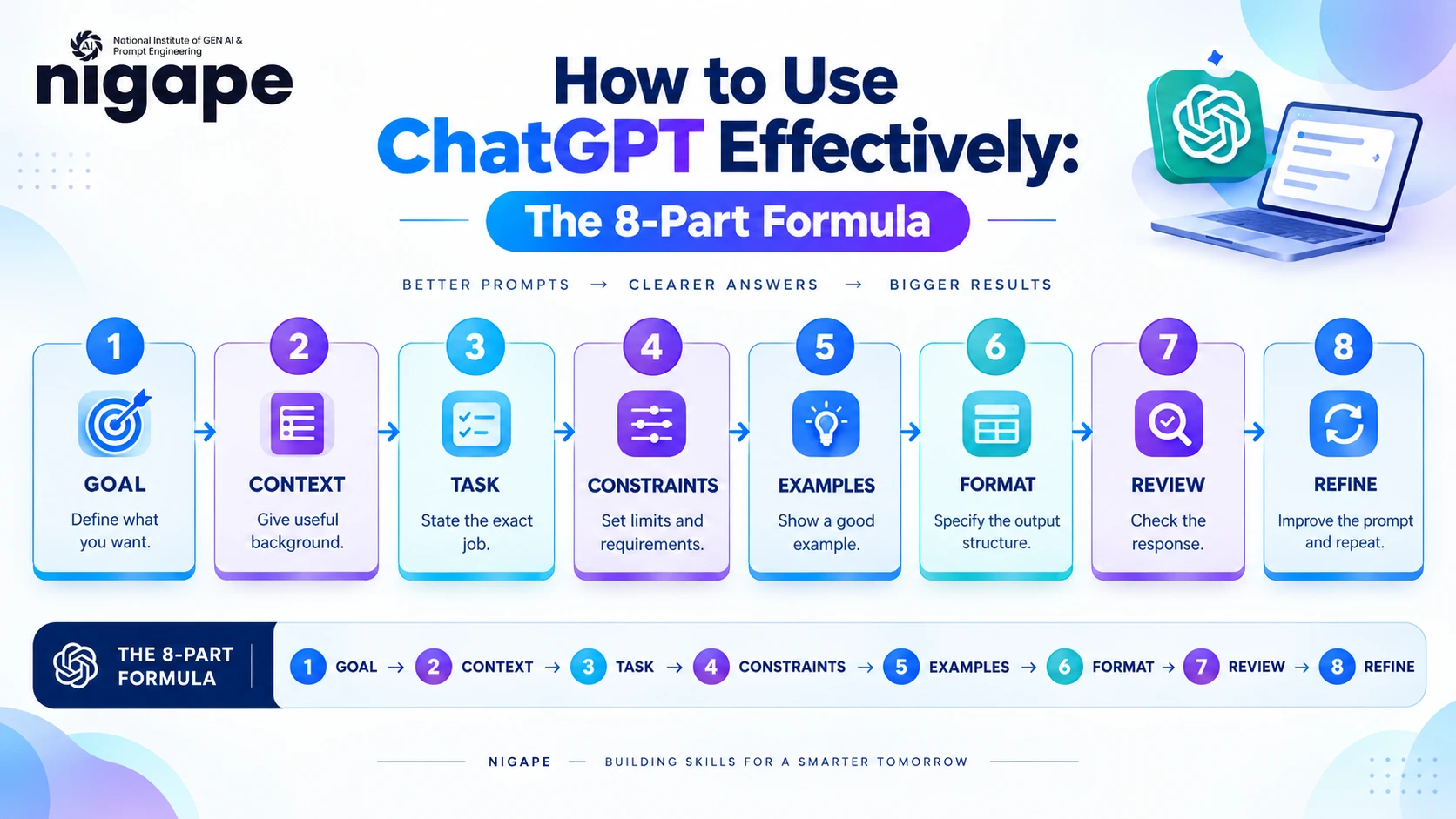
Not every task needs the whole list. Two or three parts will do for something small. When the stakes are higher, use all eight. Later, once this feels easy, you can compare it with other prompt engineering frameworks like RACE, CARE, TAG, and APE and see which one suits you better.
How Do I Get Better Answers From ChatGPT?
Add context, get specific, name the audience, ask for a format, and keep following up.
A word like "good" tells the model almost nothing, so replace it with a limit, say "under 150 words." Want a certain tone? Paste a sample of it. Ask ChatGPT to list its assumptions. Ask for three options side by side. And if it misreads you, correct it right away: "I'm in India, not the US. Redo it."
How Do I Write a Good ChatGPT Prompt?
Spell out the goal, audience, task, limits, and format. Plain words are fine.
● Weak: "Write about marketing."
● Better: "Explain digital marketing for beginners in simple English."
● Professional: "Act as a marketing consultant. Explain digital marketing to a beginner. Cover SEO, email, and social media. Give one example each, plus a comparison table. Under 800 words."
Notice how little the third prompt leaves to chance. That's why the answer feels less generic. For more on this style of writing, the guide to ChatGPT prompt engineering goes further into getting smarter results from the tool.
How Do I Fix a Bad ChatGPT Answer?
Figure out what's wrong, then fix that one thing with a specific correction.
● Too generic → add context and audience.
● Too long → set a word limit and a format.
● Wrong tone → describe the tone and paste a sample.
● Missing points → give a numbered checklist and ask it to check each item.
● Off-topic → restate the goal and say what to ignore.
Has the chat gotten tangled? Stop arguing with it. Start a new chat and open with a short summary.
How Do I Check ChatGPT Answers for Accuracy?
Use this loop: Generate → Inspect → Verify → Correct → Use.
First, ask ChatGPT to list every fact, number, and name it used. Next, check the important ones against official or primary sources. Be extra careful with news, statistics, health, law, money, and citations, because ChatGPT can make up sources that look real. If you do a lot of research, this walkthrough on how to use ChatGPT for research without plagiarism shows how to stay honest while you work.
Real-World Example
Take Meera. She has to email her manager about a deadline extension. Prompt one: "Write a polite email moving the Q3 report from Friday to Tuesday because sales data arrives Monday. Under 120 words." Prompt two: "Make it warmer." Prompt three: "Add a Thursday progress update." Then she checks the dates, edits a few lines so it sounds like her, and sends it. Three minutes in total.
Original Method: The Ask–Review–Refine–Verify–Reuse Loop
● Ask: use the 8-part formula. (Beginner)
● Review: find what's weak. (Beginner)
● Refine: use targeted follow-ups. (Intermediate)
● Verify: check facts outside ChatGPT. (Advanced)
● Reuse: save the prompt with [placeholders] as a template. (Professional)
Comparison Table
Method | Best for | Limit |
Basic prompt | Quick questions | Little context |
Structured prompt | Reports, plans | Needs planning |
Follow-up prompting | Better drafts | More turns |
Prompt chain | Multi-step work | More setup |
Tools and Skills
Tools: ChatGPT on web, desktop, or mobile. Features vary by plan, so check OpenAI's Help Center. You'll also want a notes app for saving prompts and a search engine for fact-checking. Gemini, Claude, and Copilot respond to the same habits.
Skills: clear writing, critical thinking, subject knowledge, and fact-checking.
Benefits and Limitations
Benefits: faster drafts, easier learning, quick brainstorming, and simple summaries.
Limitations: it can be wrong or outdated, it can show bias, and it lacks real-life judgment. You're still the one responsible for the result. Before using news, dates, or recent facts, double-check them on trusted sites.
Best Practices
Give one task per prompt. Say who the answer is for. Ask for a format. Refine in small steps. Before pasting anything, remove names, passwords, and confidential data.
Common Mistakes
Vague questions. Missing context. Too many tasks in one prompt. Taking the first answer as final. Trusting every fact. Copying without editing. Sharing sensitive information.
Related Entities and Trusted Sources
Related: generative AI, prompt engineering, LLM, AI assistant, hallucination, and responsible AI. For trusted reading, begin with OpenAI's prompt engineering guide and its Help Center. For the risk side, the NIST AI Risk Management Framework is a good reference on responsible AI use.
FAQs
● How do beginners use ChatGPT? Begin with one small task. Write a clear prompt, read the answer, then ask one or two follow-ups.
● What is a good ChatGPT prompt? One that states your goal, context, audience, limits, and format.
● Is ChatGPT free? OpenAI offers free and paid plans. Limits change, so check OpenAI's official pricing page.
● Can ChatGPT make mistakes? Yes. It can give wrong facts, old information, and fake sources. Always verify important claims.
● How can I use ChatGPT for studying? Ask for simple explanations, a study plan, and quiz questions one at a time. Check facts against your course material.
● How can I use ChatGPT for work or coding? Draft emails, plan meetings, explain code, and suggest tests. Review everything and test all code.
● What is prompt engineering? It's the skill of writing and refining instructions so an AI model gives better results. For most people, that means clear structure and follow-ups.
● Is it safe to share personal data with ChatGPT? Avoid passwords, ID numbers, and confidential business data. Follow your organization's AI policy.
Conclusion
Using ChatGPT effectively starts with a clear goal, useful context, and a defined format. After that, read the answer critically, ask follow-ups, and verify the facts that matter. Think of the first response as a draft, never the final product. Keep the prompts that work so you can reuse them. This week, try it on one real task, like an email, a study plan, or a short report. Practice daily and you'll grow from beginner into a confident, professional ChatGPT user.