
·



November 5, 2026
AI Prompt Generator: Turn Ideas Into Better AI Results
Table of contents
AI Prompt Generator: Transform a Rough Idea Into a Clear, Context-Rich Prompt for Writing, Research, Coding and Image Creation
Ever asked an AI to “write a blog” and got a page of nothing much? Here’s why. The request was thin, so the answer was too. A prompt generator fixes that. You give it a rough goal, and it builds a complete instruction for ChatGPT, Gemini, Claude or an image model. It supplies whatever you forgot: the reader, the tone, the format, the length. So “write a blog” comes back with a topic, an audience, a structure and some ground rules. It saves time. It makes you clearer. What it won’t do is check the answer for you. That part stays yours: run the prompt, then verify the facts.
Key Takeaways
● A prompt generator turns a vague idea into a clear instruction.
● Good prompts state the goal, context, audience, rules and format.
● Test every prompt. Check every fact.
● Writing, image, code and data tasks each want a different prompt.
● Thinking of a free tool? Check the privacy terms and limits first.
In this guide: definition, how it works, steps and example, framework, use cases, tools, mistakes, FAQs
What Is an AI Prompt Generator?
A prompt is the instruction you give an AI. A generator writes it for you, or tidies one you already have. Run it before your real task, then paste the output into ChatGPT, Gemini, Claude, Microsoft Copilot or an image tool.
Technical view: a large language model (LLM) only knows what you tell it. Fuzzy input, generic output. That’s the whole problem, really. A generator fills in the gaps so the model isn’t left guessing.
Term | What it does |
Prompt generator | Creates a new prompt from your goal |
Prompt optimizer | Improves a prompt you already wrote |
Prompt template | A fill-in-the-blank structure |
Prompt library | A saved collection of ready-made prompts |
A generator is just one piece of prompt engineering, the bigger craft of designing and testing prompts. Starting with only an idea? Create from scratch. Got a draft that’s close? Reach for an optimizer.
How an AI Prompt Generator Works
The flow is easy to follow:
● You share your goal.
● The tool asks a few questions: audience, tone, length, format.
● Your answers get shaped into a structured prompt.
● You see a draft.
● You test it, then tweak it.
Some tools just fill a fixed template. Quick, and no surprises. Others hand your idea to an AI model that rewrites it. You get more flexibility, sure. You also get output that changes each time, and now and then the tool adds details you never asked for.
How to Use It, Step by Step (With Example)
● Write your rough idea. Don’t polish it. Something like “Write a blog about remote work.”
● Answer the questions. Who reads it? Why do they care? What tone? How long?
● Generate the prompt.
● Test it in the AI tool you plan to use.
● Fix and repeat. Check the facts. Change one thing at a time, never several.
Improved prompt (an example, not a proven result):
Write a 1,200-word blog post, “How to Stay Productive When Working From Home,” for first-time remote workers. Tone: friendly and simple. Use a short intro, five numbered tips with one example each, and a short conclusion. Do not invent statistics; mark any fact that needs a source with [verify].
Why it works: the AI knows the reader, the goal, the tone and the structure, and it’s told not to make up facts. Want some practice? Read how to generate effective AI prompts, then compare your own drafts with this one.
The Prompt Ladder: A Beginner-to-Professional Framework
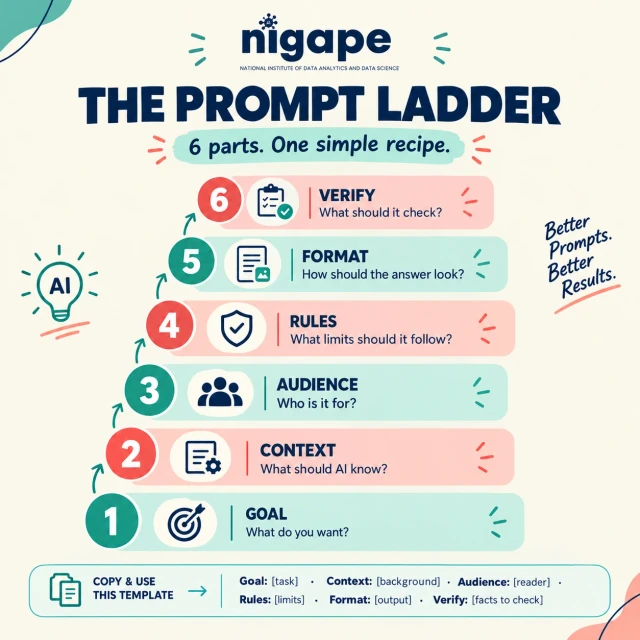
Six parts, one recipe: Goal, Context, Audience, Rules, Format, Verify. Here’s a template you can copy as is:
Goal: [task]. Context: [background]. Audience: [reader]. Rules: [limits, tone, things to avoid]. Format: [list, table, JSON]. Verify: [facts to flag].
Level | Skill | Practice task |
1. Beginner | Clear goal, audience, format | Rewrite “tell me about solar power” with all three |
2. Intermediate | Rules, examples, reusable templates | Build a product-description template and test it on three products |
3. Advanced | Split big tasks, ask for JSON, handle edge cases | Break “write a report” into three prompts |
4. Professional | Version prompts, test many inputs, track errors | Compare two prompt versions on 20 safe sample inputs |
Once you work at a professional level, you score every version: task completion, accuracy, format, consistency, safety. The version that passes the most tests wins. Many teams go a step further and keep their best prompts as shared patterns. AI prompt templates and frameworks shows what that looks like.
Use Cases: What to Include by Task
Task | Include | Starter |
Writing | Reader, tone, structure | “Outline a beginner post on composting.” |
Image generation | Subject, style, light, mood, exclusions | “Watercolor lighthouse at dawn, soft colors, no text.” |
Coding | Language, input, output, tests | “Write a Python 3 function that removes duplicate emails.” |
Data analysis | Columns, question, limits | “Suggest three analyses; do not claim causes.” |
Tools don’t all take input the same way. Spend two minutes with the guide for yours before you start. Working in a chatbot? Begin with AI prompts for ChatGPT, then change the wording for Gemini, Claude or Copilot.
Tools, Benefits, and Limits
Benefits: you save time, your wording gets sharper, beginners feel less lost, and a team writes prompts in one consistent way.
Limits: a good prompt can still lead to a wrong answer. Models make mistakes, plain and simple. Read the whole output before you share or publish it.
What to look for: audience and tone fields, platform options, editing, reusable templates, clear privacy terms. As for “the best” tool? Don’t say it until the tool has handled your own task.
Before using a free tool, check: usage limits, login needs, the privacy policy, data retention, save and export options, supported AI platforms and ads. Terms shift often, so confirm them on the tool’s own page. Then give two or three tools the same rough idea and compare what you get.
Best Practices and Common Mistakes
Mistake | Fix |
Using the first draft | Read it and edit it |
Conflicting rules (“short” but “cover everything”) | Pick a priority |
Missing context | Add background and source text |
Trusting facts blindly | Verify in primary sources |
One prompt for every task | Keep separate templates |
Sharing private data | Use placeholders like [Customer A] |
Judging by length | Judge by test results |
Evidence and Trusted Sources
OpenAI’s prompt engineering guide explains strategies, techniques and tools for building prompts. Its advice on clear instructions and testing matches what you’ve read here.
Google’s prompt design strategies for Gemini page frames prompt work as something you repeat and improve, and it covers constraints and structured output. Both ideas sit right alongside the Rules and Format steps in the ladder.
Frequently Asked Questions
1. What is an AI prompt generator?
A tool that writes clear instructions for AI. You give it a goal, it adds the audience, tone and format, and the AI gets more to work with.
2. Is there a free AI prompt generator?
Some, yes. Limits, logins and data rules differ from tool to tool, and they change, so read the current terms. Or skip the tool entirely and use the six-part recipe above in any chatbot.
3. How does an AI prompt generator work?
It collects your goal and details, arranges them into a structure, and sometimes asks an LLM to polish the wording. After that it’s on you to test and refine.
4. Can I use an AI prompt generator for ChatGPT?
Yes. A prompt is plain text, so you can paste it into ChatGPT, Gemini, Claude or Copilot. Each model responds a little differently, so test it in all of them.
5. Can an AI prompt generator create image prompts?
Yes. A good image prompt covers the subject, style, lighting and composition, plus what to leave out. Wording rules change between tools, so look at your image tool’s guide.
6. What is the best AI prompt generator?
No single one. It depends on your task, your privacy needs, the platforms you use and the price. Test two or three with the same idea.
7. How do I write a good AI prompt?
Give it the goal, context, audience, rules and format. Ask the AI to flag any facts to verify. Run it, check the result and change one thing at a time.
8. Is it safe to use online prompt generators?
Depends on the tool. Read the privacy policy, keep confidential data out and use placeholders while you test. Never paste passwords, client data or private documents.
Conclusion
An AI prompt generator helps you write better instructions, but you’re the one in the driver’s seat. Start with a simple goal. Let the tool add the audience, tone and format. Then test the prompt in your chosen AI, check every fact, fix the weak parts and save the version that works best. Keep doing that and you’ll grow from beginner to professional, with clear prompts, reusable templates and careful testing. Pick one real task today. Generate a prompt, run it, and make it better one more time.