
·



October 14, 2026
Vibe Coding: Turn Ideas Into Tested, Working Apps
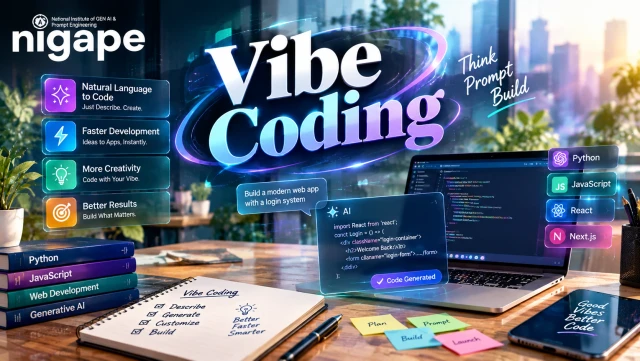
Table of contents
Vibe Coding: Turn a Plain-English Idea Into an AI-Built App You Can Test, Debug and Deploy
Describe the app you want the way you’d explain it to a friend, and an AI turns that into code. That’s vibe coding. You run what comes back, click around, and ask for tweaks without leaving the chat. It’s a handy shortcut for beginners who want a simple app or prototype. But the code isn’t gospel. It can hide bugs and security holes, so test it, keep your secrets secret, and have someone else look it over first.
Key takeaways
● Vibe coding means building apps by chatting with an AI in plain English.
● The LLM predicts code from your prompt and project files.
● Think small: one feature, test it, save it, repeat.
● Testing and security land on you.
● Anything risky should get an expert’s eyes.
What Is Vibe Coding?
Simple explanation. Picture a helper who types way faster than you. You tell it, “Make a to-do list with a delete button.” Done. Something looks off? You say so, and it fixes it. That’s the whole idea.
Technical explanation. An LLM (large language model) has read a mountain of text and code, so it knows what code tends to look like. It takes your prompt plus the files in its context window, meaning everything it can see at once, and predicts code that fits. The app wrapped around the model does more than most people realize: it edits files, runs commands, shows a preview and hands errors back. For the basics, see how generative AI helps with coding. Andrej Karpathy coined the term on February 2, 2025, for quick, barely reviewed, throwaway projects. These days it’s used for nearly any app built with AI help.
How Does Vibe Coding Work?
You describe the app, the AI writes it, you review and test it, and you repeat until it works.
Workflow: Idea → Prompt → Code → Review → Test → Deploy
● Describe the idea and who will use it.
● Prompt clearly. Spell out the features, the look, and the limits.
● Generate the first draft.
● Review. Click on everything. Skim the code too.
● Improve it, one small change per prompt.
● Test and debug. Paste the exact error into the chat.
● Deploy. Keep secrets in environment variables, then try the live link.
Results depend on how well you ask, so before you start, get comfortable with prompts for AI-assisted coding.
Is Vibe Coding Good for Beginners?
Yes, as long as the project stays small. Results come quickly, and if a line confuses you, ask the AI what it does. Still, pick up basic HTML and JavaScript so you spot mistakes faster.
Is Vibe Coding the Same as No-Code or AI-Assisted Coding?
Not quite. No-code tools give you ready-made blocks. AI-assisted coding is the bigger bucket, and autocomplete sits in it. Vibe coding hands you real code from a chat, which you can edit later.
Is Vibe Coding Safe?
Only when you check what it produces. AI code can hide bugs, leaked keys and weak login rules. Don’t test with real personal data. For payments or anything sensitive, call in an expert.
Can Vibe Coding Build a Full App?
For simple ones, yes. Some tools build the front end, back end and database together. Quality bounces around, so check logins and data rules yourself.
Real-World Example
Illustrative scenario, not a test result. Pick one of the AI coding tools for vibe coding and type: “Build a landing page for a dog-walking service with three price cards and a booking form. Make it mobile friendly.” A draft shows up with a preview. Does the email field validate? Do the cards stack nicely on a phone? Does “Book now” really send the data anywhere? Fix one problem at a time.
The BUILD Method (Original Framework)
● Brief: write down the goal, the user and the features.
● Understand: ask the AI to explain the code it just wrote.
● Iterate: change one thing per prompt and save every version that works.
● Look for bugs: try adding, editing, deleting, empty input and a phone screen.
● Defend: hide your keys, validate input, check logins and review packages.
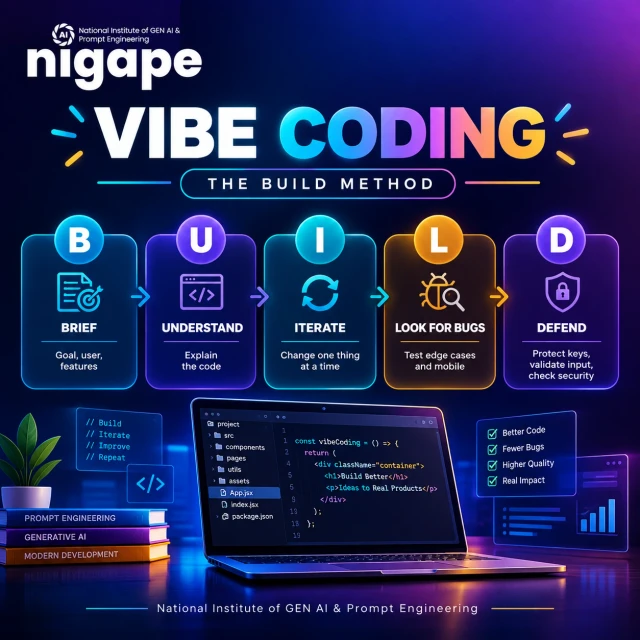
Try it on a task list: brief it, add an empty task, watch it break, ask for a fix, retest.
Prompt Template
Build [app] for [user].
Features: [list 3 at most].
Tech: plain HTML, CSS, JavaScript.
Rules: mobile friendly, validate input, no secrets in code.
Vibe Coding vs Traditional Coding
Factor | Vibe coding | Traditional coding |
First draft | Mostly AI | Mostly developer |
Skill to start | Low | Medium to high |
Early speed | Fast for simple tasks | Slower |
Control | Depends on your review | High |
Testing and security | You must ask for and check them | Standard in mature teams |
Best for | Prototypes, learning | Production, high-risk software |
Best Vibe Coding Tools (Free Access Checked October 14, 2026)
Tool | Best for | Free access |
Cursor | AI code editor | Free plan, limited use |
GitHub Copilot | AI in editors and GitHub | Free plan, limited use |
Replit | Build and host in the browser | Starter plan, daily credits |
Lovable | Prompt-to-web-app | Daily credits, monthly cap |
Fast full-stack previews | Monthly tokens, daily cap | |
Google AI Studio | Gemini-powered apps | Free to start, quotas apply |
Free access isn’t free hosting. Credits, quotas and hosting are separate, so read each pricing page. Claude and ChatGPT can write code too.
Skills: Beginner to Professional
Level | Learn | Portfolio project |
Beginner | Clear prompts, basic HTML | A static website you can explain |
Builder | JavaScript, APIs, dev tools | A working API integration |
Intermediate | Git, logins, databases | Stored data users cannot cross-view |
Professional | Architecture, review, CI | Tested app with monitoring |
Benefits and Limitations
Benefits:
● Easy to start
● Fast prototypes
● You learn by asking “why”
● Less dull, repetitive code
Limitations:
● The code may be wrong or unfinished
● Bugs and security holes can hide in it
● Usage costs can sneak up on you
● Code nobody understands later
Best Practices and Common Mistakes
Do:
● Use Git, small steps, tests and fake data
● Keep your secrets safe
● Have an expert review risky apps
Avoid:
● Vague prompts and too many features
● Accepting code you haven’t read
● Ignoring errors
● Leaving API keys in front-end code
● Deploying something you haven’t tested
Professional Checklist: Apps With Real Users
● Code review: a second person reads every change.
● Dependencies: scan your packages for known vulnerabilities.
● Access: check authorization on the server. Log in as two users and see if either can view the other’s data.
● Data: validate server-side, set database rules, keep backups.
● Automation: run tests in CI (continuous integration) on every change.
● Operations: set up monitoring and a rollback plan.
Where Vibe Coding Started and What to Secure
It all began with Karpathy’s original post on X, where he described a fast, loosely reviewed way to work on throwaway projects. Careful teams now add review and testing.
The OWASP Top 10 lists the most common web risks, like broken access control and injection. Check generated code against it before real users arrive.
FAQs
1. What is vibe coding in simple words?
You tell an AI what you want in plain English, then test and fix whatever it builds.
2. Who invented vibe coding?
Andrej Karpathy used the term in an X post on February 2, 2025.
3. Is vibe coding free?
Many tools start free, but credit or token limits apply. Use them a lot and you’ll pay.
4. Which tool is best for beginners?
Browser builders like Replit, Lovable or Bolt.new show a live preview fast. Compare their free limits first.
5. Do I need to learn coding?
Not to begin. Basic HTML, JavaScript and Git still help you find mistakes.
6. Can vibe coding replace developers? No. It speeds up some tasks, yet design, testing, security and upkeep still need skilled people.
7. How do I debug AI-generated code?
Reproduce the bug, copy the full error, share it with the code, apply one fix and retest.
8. How do I start a vibe coding project?
Choose a tiny idea like a task list, write a clear prompt, and test each feature as you build it.
Conclusion
Vibe coding lets anyone turn a plain-English idea into a working app, from a first experiment to a professional project. The recipe is short: describe clearly, build small, read the code, test every feature and protect your secrets. The AI writes fast, but quality and safety are still up to you. Start with one tiny task list today.